Network Cabling and Wi-Fi Security: A Practical Guide
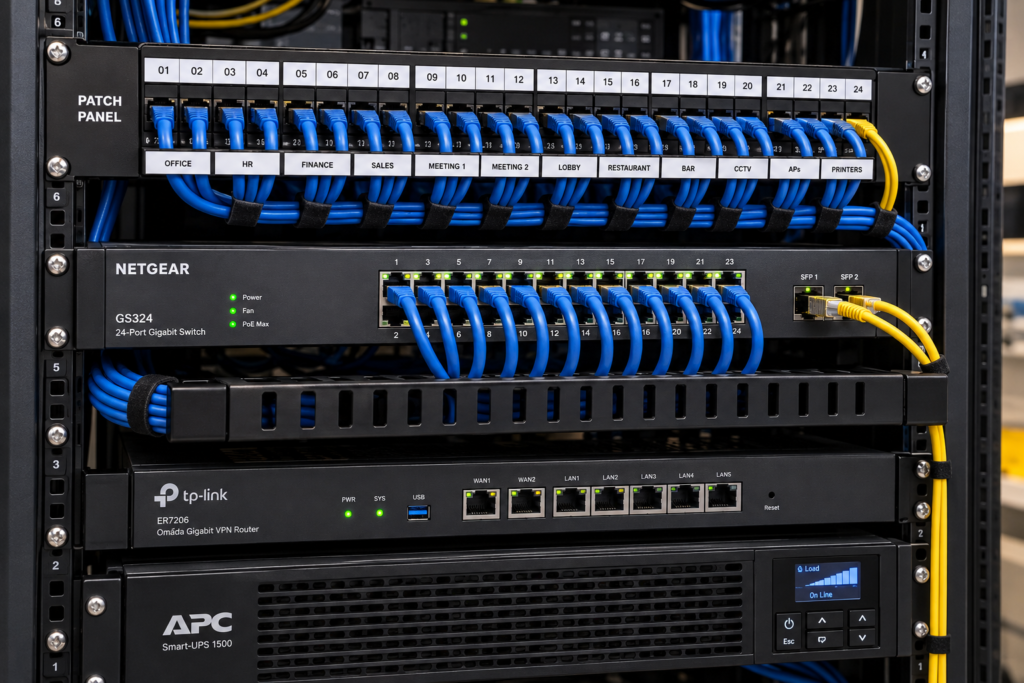 A dependable network begins with a wired plan and a secure wireless design, not with extra extenders added after problems appear. List the users, devices, rooms, applications, and coverage needs first. Milk Electrical Los Angeles can then be evaluated for coordinating cable pathways, access-point locations, network equipment, power, and documentation for stable day-to-day connectivity.
Start With Requirements, Not Hardware
Create an inventory of what will use the network. Include computers, phones, televisions, cameras, access controls, AV systems, printers, and guest devices. Note which devices are stationary, which move, and which perform time-sensitive or high-bandwidth work.
Next, mark the spaces that need service. Floor area alone is not enough. Wall materials, floors, metal, glass, equipment rooms, exterior areas, and neighboring networks can affect wireless performance. Record critical locations such as offices, media rooms, and network closets. A site survey can turn those requirements into informed cable and access-point locations.
Use Wired and Wireless Connections for Different Jobs
Wi-Fi provides mobility, while structured cabling provides a predictable path for fixed devices and wireless access points. A well-planned system uses both. Workstations, televisions, cameras, control processors, and access points may benefit from Ethernet where installation and device support allow it. Phones, tablets, and roaming devices still need properly designed Wi-Fi coverage.
An access point with a wired connection does not have to repeat traffic over the same wireless path in the way some extenders do. The design should consider internet service, switching capacity, device ports, cable distances, power requirements, and expected traffic rather than promising a speed the full system cannot deliver.
Build a Serviceable Cabling Backbone
Choose an accessible central location for the router, switches, patch panels, and related equipment. Provide suitable power, ventilation, mounting, and working clearance. Avoid locations exposed to excessive heat, moisture, dust, storage impacts, or unauthorized access.
| Cabling decision | Good planning practice |
|---|---|
| Pathways | Coordinate routes before walls and ceilings close |
| Cable endpoints | Label both ends with consistent identifiers |
| Patch panel | Organize permanent runs centrally |
| Access points | Provide wired data and required power |
| Spare capacity | Allow room for likely additions |
| Documentation | Record port, room, device, and test information |
Clients researching network cabling agoura hills should ask whether the scope includes pathway planning, termination, labeling, testing, access-point coordination, and an as-built record—not merely cable pulling.
Secure the Wireless Network From the Beginning

Security settings belong in the installation plan and handover process. Change default administrative credentials, use a current supported encryption option, apply device updates, and restrict access to management interfaces. Separate guest access from trusted devices where the equipment supports it, and do not use administrator access as the everyday Wi-Fi password.
The Cybersecurity and Infrastructure Security Agency’s guide to securing wireless networks is an official reference for understanding common wireless risks and ways to reduce them. Choices should match the equipment, risk level, and current vendor support. For a business or network handling sensitive systems, involve a qualified cybersecurity professional in the design and review.
Plan Segmentation and Ownership
Not every device needs the same access. Guest devices generally do not need to communicate with cameras, office computers, control systems, or administrative tools. Segmentation can reduce unnecessary exposure, but it must be designed and tested so required services still work.
Assign ownership for recurring work. Someone should handle firmware reviews, account changes, configuration backups, failed-device replacement, provider coordination, and removal of old users or equipment. Record the process without placing passwords in an unsecured handover document.
Test Performance and Document the Result
Test each permanent cable run with appropriate equipment and save results when included in the scope. Verify wired links at their intended ports, then test wireless coverage, roaming, and application performance in important rooms. A signal indicator alone does not prove that video calls, streaming, controls, or uploads will work reliably.
Complete these checks before handover:
- Confirm the network name, guest access, and approved security settings
- Verify every access point and critical wired endpoint
- Test normal use in representative locations
- Label rack equipment, patch-panel ports, and room outlets
- Save an equipment list, network diagram, and configuration backup
- Explain safe restart and support procedures
Conclusion
Reliable connectivity comes from treating cabling, Wi-Fi, security, power, and support as one system. Define requirements, wire fixed infrastructure deliberately, place access points from evidence, secure the network at installation, and document the result. That foundation is easier to troubleshoot, safer to operate, and more adaptable as devices and needs change.
FAQ Section
Is Ethernet always faster than Wi-Fi?
Not always. Performance depends on equipment, cable condition, port speeds, wireless standard, interference, client capability, configuration, and internet service. Wired connections are often more predictable for fixed devices, but the complete path determines results.
Where should wireless access points be installed?
Locations should follow a site survey and building layout. Central, unobstructed positions often help, but construction materials, floor levels, device density, outdoor needs, and cable access can change the best placement.
Should smart-home or business devices use a separate network?
Separating device groups can improve control and reduce unnecessary access when implemented correctly. The design depends on equipment capabilities and which devices must communicate, so configuration and testing are essential.
What documentation should a cabling installer provide?
Useful documentation includes labeled outlet and port records, cable test results if included in scope, an equipment list, a simplified network diagram, access-point locations, warranty details, and support responsibilities.